
Create an invoice for a client in just a few clicks
The full invoicing cycle — inside a single service.
Invoice information
Amount
4 850 000
UZS
397.54 USD
CB: 1 USD = 12 200 UZS
Client information
Client name
Rustam Djalilov
Phone number
+998 98 999 99 99
Payment period
Active until 23.05.2026, 23:59:59
Available to everyone — regardless of business type
The invoicing feature is already included in the payment service and available to all clients — with no additional setup or configuration.
Available to all Global Pay clients
No separate setup required
Works with any payment instrument

Online store
Retail e-commerce

Services
B2C and B2B

Marketplace
Multiple sellers

Subscription
SaaS and services

Aggregator
Combining suppliers

Franchise
Network of points under one brand
Everything you need — already inside
A feature that changes the approach to invoicing.
From invoice creation to payment — four steps
The entire process — in a single interface, with no switching, in just a few minutes.
Create invoice
Get payment link
Send invoice to client
Pay invoice

Create invoice
Go to the invoicing section in your personal cabinet. Fill out the template: enter recipient details, list of items, amount, and payment deadline.
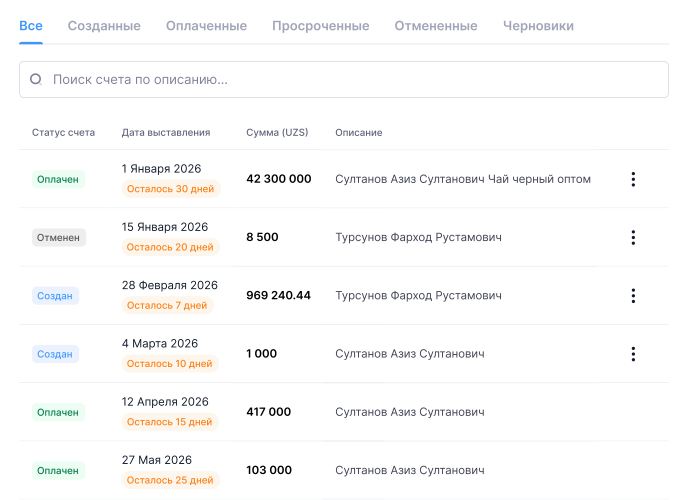
All invoices under control — in a single dashboard
Once connected, your personal cabinet will get a dedicated section for managing invoices — with history, client database, and templates.

Invoice history
All issued invoices are shown in a single list — with details, amounts, and current payment statuses.

Invoice templates
Create a template once and reuse it — convenient for recurring and standardized invoices.

Client database
Recipient data is saved automatically — no need to re-enter it the next time you issue an invoice.
Automate invoicing — with Global Pay
The invoicing feature is activated together with the service — no separate integration. Submit a request, and our team will help you choose the right solution.